
CloudWave Partners with Creatio No-Code CRM

CloudWave Partners with Creatio No-Code CRM
CloudWave Inc. Partners with Creatio to Propel AI-Powered Digital Transformation Across Enterprises

TYSONS, VA, May 7, 2025

CloudWave Inc., a leading provider of cloud-native automation and integration solutions, is delighted to announce its partnership with Creatio, a global vendor of a platform to automate workflows and CRM with no-code and a maximum degree of freedom. The partnership is aimed at accelerating AI-driven digital transformation initiatives for businesses worldwide.

This collaboration brings together CloudWave’s deep expertise in Artificial Intelligence, application modernization, cloud infrastructure and intelligent automation with Creatio’s powerful platform, enabling organizations to rapidly streamline processes, enhance operational agility, and deliver seamless customer experiences.

“We’re excited to partner with Creatio to help organizations unlock the full potential of no-code innovation,” said Prabhakar Ramakrishnan, CEO of CloudWave Inc. “This partnership aligns perfectly with our mission to empower enterprises with scalable, AI-enhanced solutions that drive efficiency and growth.”

Creatio offerings include a no-code platform (Studio Creatio), CRM applications (marketing, sales, and service), industry workflows for 20 verticals, and marketplace add-ons. Creatio is recognized as a Leader and Strong Performer in multiple Gartner and Forrester reports. Creatio products receive raving end-user reviews on peer-to-peer portals.

Through the partnership, CloudWave will offer intelligent automation tools within Creatio’s platform, enabling customers to design and deploy complex workflows, AI models, and customer engagement strategies with unprecedented speed and flexibility. CloudWave will also provide consulting, implementation, and support services for Creatio’s solutions.

About Creatio

Creatio is a global vendor of one platform to automate workflows and CRM with no-code and maximum degree of freedom. Millions of workflows are launched on our platform daily in 100 countries by thousands of clients. Genuine care for our clients and partners is a defining part of Creatio’s DNA.

For more information, please visit www.creatio.com

About CloudWave

CloudWave Inc., established in 2012, is a Virginia-based Information Technology consulting firm specializing in innovative cloud technologies and digital transformation. With extensive experience in systems architecture and government contracting, CloudWave delivers sophisticated solutions across federal and commercial sectors. The company excels in cloud computing, artificial intelligence, machine learning, and custom application development, consistently helping clients achieve their technological objectives.

CloudWave Inc. has served as a proven partner focused on implementing enterprise applications and integrations using cloud platforms like Salesforce, Google Cloud, AWS, MuleSoft, Smartsheet, DocuSign, and more.

For more information, visit https://cloudwaveinc.com/ or follow along on LinkedIn at https://www.linkedin.com/company/cloudwave/.

Contact:
Prabhakar Ramakrishnan
info@cloudwaveinc.com
(571) 303-9296
Salesforce Lease Document Management Case Study | Public Sector

Improving Document Management with Salesforce

Overview

Our client, a government agency that manages federal real estate, offers leasing contracts with the United States Government to private property owners. These contracts naturally require many different types of documentation and paperwork.

With disparate filing systems for different types of documents, there was plenty of room for human error and decreased efficiency when federal agents needed to access and reference records for the leasing contracts.

In an effort to improve document management for everyone, the agency hired CloudWave to update the website and accompanying Salesforce org used for real estate taxes to include other key documents and offer an easier submission process for property owners. Here’s how our team tackled the challenge.

Project

In order to make the right improvements to the real estate taxes site and transform it into an overall lease management site, CloudWave Salesforce Architects needed to carefully review the current state and understand how it was functioning.

One of the key pain points stemmed from a record-sharing process that required users to request access from admins before any document submission could take place. The system was also only set up for tax document submissions, so there would need to be workflow changes with different options users could select based on the type of document they needed to submit. And finally, the document submissions from this system would ultimately integrate with another external real estate exchange team. The architects and developers needed to ensure the other team’s system was set up to receive new types of documents.

The 8-month project was broken into 3-week sprints with specific goals for the CloudWave Salesforce Developers to tackle, like granting access to submissions without record-sharing and enhancements to the submission process to capture contact info and comments automatically. The team also leveraged Lightning Web Components, Aura Components, and Apex Classes to facilitate the functionality for users to search for a lease, save a lease, submit a wider variety of documents related to a lease, and view attachments they have previously submitted.

The CloudWave team periodically hosted demos for the government agency to assess progress and ensure the solution was aligned with the end goals for users. As development continued, Quality Assurance teams tested and confirmed functionality for the new app and ensured there were no other disturbances to the Salesforce org.

Results

  • Users can not only upload real estate tax documents, but also change of ownership, novation, lab test documents, small business subcontracting, and more into one comprehensive site.
  • The lease management site works in tandem with the real estate exchange team without any errors or disruptions.
  • There is no longer the need for record sharing before uploading documents on appropriate leases.
  • Users can instantly search for their records and save frequently-used documents to a list.
  • UI improvements to the lease management system: an updated navigation menu, a new resources page, and updated workflows.

About CloudWave

CloudWave Inc. is an information technology consulting firm based in Virginia that provides end to end services from architecture to development in niche cutting-edge cloud technologies. CloudWave specializes in application development, integration, and cloud offerings – SaaS, PaaS, IaS, machine learning/artificial intelligence, analytics/business intelligence, microservices, and enterprise document management. Since 2012, the company has developed classified/unclassified, innovative, cost-saving, low-risk solutions to federal and commercial customers both within the United States and globally. The team has more than 30 years of exceptional systems and architectures experience managing complex and compliant projects.

CloudWave has successfully integrated Smartsheet with Salesforce, MuleSoft, Google Cloud, Azure, Jira, Hubspot, and more so that our clients can have real-time access to all relevant information across multiple systems.

With CloudWave on your side, you can feel peace of mind knowing that you are working with an official Smartsheet platinum Partner. Our team has the expertise and experience to determine your organization’s vision, and then design a powerful solution to meet those needs.

For more information, get in touch with us here.

Merging Government Leasing Apps in Salesforce

Merging Government Leasing Apps in Salesforce

Overview

Our client, a government agency that manages federal real estate, offers leasing contracts with the United States Government to private property owners.

Historically, they used two different digital applications to handle single award lease procurement (contracts with specifications for a particular space) and multiple award lease procurement (which allows the market to compete for multiple federal leases via a single offer). It wasn’t possible to share information about available properties between the two apps, which meant that property owners had to register login info on two different websites and complete the process for submitting their building specs twice for every property.

In an effort to improve customer experience on their website and streamline the submission process for property owners, the agency hired CloudWave to combine these two different applications into one central framework in Salesforce. Here’s how our team tackled the challenge.

Project

In order to build a road map to a better future state, CloudWave Salesforce Architects needed to carefully review the current state and establish how the most important elements from each app could be combined into one seamless process for users.

They ultimately decided to merge the two apps into one home page with a singular login and workflow for all properties, only branching off as needed for single award or multiple award lease procurement submissions. This would simplify the process both for property owners as they input building data, and for government employees as they reviewed the information and matched up available properties to leasing contracts.

The 8-month project was broken into 3-week sprints with specific goals for the CloudWave Salesforce Developers to tackle, like updates to the overall workflow for users, menu changes, and UI improvements. The dev team used Salesforce Lightning Web Components to combine the existing property objects in each old application into new objects in the new application – ensuring that historical data would not be lost.

The CloudWave team periodically hosted demos for the government agency to assess progress and ensure the solution was aligned with the end goals for users. As development continued, Quality Assurance teams tested and confirmed functionality for the new app and ensured there were no other disturbances to the Salesforce org.

Results

  • Only one site login for property owners.
  • Integrated the functionality of each app into one singular site.
  • Data and workflows from each app successfully combined to reduce manual effort inputting building specs.
  • Site smart enough to determine the pages and workflow style the user needs to fill out for single award lease procurement vs. multiple award lease procurement and populate accordingly.
  • Ability to replicate building information across multiple offers, whether they are single or multiple lease procurement.
  • Old Salesforce components transitioned to new Lightning Web Components.
  • Updated branding to reflect the new application.
  • Updated URLs, contact details, menu options, and UI formatting to improve overall user experience.

About CloudWave

CloudWave Inc. is an information technology consulting firm based in Virginia that provides end to end services from architecture to development in niche cutting-edge cloud technologies. CloudWave specializes in application development, integration, and cloud offerings – SaaS, PaaS, IaS, machine learning/artificial intelligence, analytics/business intelligence, microservices, and enterprise document management. Since 2012, the company has developed classified/unclassified, innovative, cost-saving, low-risk solutions to federal and commercial customers both within the United States and globally. The team has more than 30 years of exceptional systems and architectures experience managing complex and compliant projects.

CloudWave has successfully integrated Smartsheet with Salesforce, MuleSoft, Google Cloud, Azure, Jira, Hubspot, and more so that our clients can have real-time access to all relevant information across multiple systems.

With CloudWave on your side, you can feel peace of mind knowing that you are working with an official Smartsheet platinum Partner. Our team has the expertise and experience to determine your organization’s vision, and then design a powerful solution to meet those needs.

For more information, get in touch with us here.

XCavate: Creating a Searchable Backup of Salesforce Records

XCavate: Creating a Searchable Backup of Salesforce Records

Overview

Salesforce admins and developers are all too familiar with the limitations of traditional Salesforce backups. When Salesforce records are deleted, they stay in the recycle bin for 15 days. After that time period elapses, they are gone permanently.

There are so many scenarios where data can be accidentally deleted or compromised: an HR professional accidentally deletes an employee’s record, the integration of a new accounting app overwrites critical data about last year’s earnings, or someone in the IT department delpoys untested code and it breaks something in the org.

Our team at CloudWave developed a solution called XCavate so that one of our long-term Salesforce clients could always recover lost records and easily search for the specific information they needed. Then, we made this technology available to other Salesforce users in AppExchange.

Project

First and foremost, we wanted to solve the problem of losing access to crucial Salesforce data after the 15-day window in the recycle bin elapses.

Our team built a system that backs up records as frequently as necessary and stores them for as long as you need them. Users can customize backups in XCavate to only include specific objects and categories so that the storage is allocated to the most important and relevant records. You can choose a specific time to back up your data daily or run an immediate backup on demand. You can also determine how many days each backup will be stored and adjust according to your business needs and cloud storage availability.

XCavate can also back up event log files: the records for actions people took within Salesforce, interacting with objects and features. Since this data is normally only accessible to Salesforce users on an external website for a very limited time, this addition was crucial for improving data security for our client. Within XCavate, you can easily discern which users clicked on objects, shared files, edited text fields, posted or deleted messages in chatter, and more. XCavate can make your logs accessible and auditable at a moment’s notice.

XCavate uses the client’s own elastic backend storage so that each client can manage their data needs accordingly. Using this framework, our team included advanced elastic search capabilities that help users narrow down results and recover the exact records they need more quickly. We call this “digging your data.”

Results

XCavate is available now in the Salesforce AppExchange.

Key Features Include:

  • Scheduled and On-demand Backups: Customize the objects or event log types you need to back up and schedule for any day or time.
  • Backups Available 24/7: Access your data instantly without any complicated requests!
  • Backups Without Limits: No time or data size limits.
  • Permanent Retention of All Logs: Find out who did what within your Salesforce event logs, dating back as far as you need.
  • Advanced Search Capabilities: Search by object or event type, file name, time period, and more to help you recover your records faster.

About CloudWave

CloudWave Inc. is an information technology consulting firm based in Virginia that provides end to end services from architecture to development in niche cutting-edge cloud technologies. CloudWave specializes in application development, integration, and cloud offerings – SaaS, PaaS, IaS, machine learning/artificial intelligence, analytics/business intelligence, microservices, and enterprise document management. Since 2012, the company has developed classified/unclassified, innovative, cost-saving, low-risk solutions to federal and commercial customers both within the United States and globally. The team has more than 30 years of exceptional systems and architectures experience managing complex and compliant projects.

CloudWave has successfully integrated Smartsheet with Salesforce, MuleSoft, Google Cloud, Azure, Jira, Hubspot, and more so that our clients can have real-time access to all relevant information across multiple systems.

With CloudWave on your side, you can feel peace of mind knowing that you are working with an official Smartsheet platinum Partner. Our team has the expertise and experience to determine your organization’s vision, and then design a powerful solution to meet those needs.

For more information, get in touch with us here.

Creating a Grant Management System with AI in Salesforce

Creating a Grant Management System with AI in Salesforce

Overview

The client, a government agency with a high volume of incoming grant funding requests, needed a solution that would help them stay organized, maintain their data, and manage grant applications efficiently. Our team used Salesforce to develop a custom system for vetting grant applications and managing contacts and documents throughout the whole lifecycle of the grants, incorporating cutting-edge AI technology.

Project

The biggest pain points for admins involved in grant applications were centered around saving time, improving efficiency, and maintaining important records. Our team of experienced developers at CloudWave chose to solve these problems by building a fully custom system in Salesforce. Salesforce has versatility for a wide variety of different use cases and can be integrated with hundreds of different external applications as-needed.

In addition to building a straightforward data management system in Salesforce, our team prioritized the latest AI technology to emphasize efficiency. Tools for automation and artificial intelligence built directly into the platform are an essential solution to saving admins time on tedious, repetitive tasks.

First, the CloudWave team designed the grant management system so that applicants can submit their documents and log in to check on the status of their applications, chat with admins, or upload additional documents upon request.

Driver’s License Verification

The first step in the application process to use AI is a driver’s license verification. When a user decides to apply for a grant, the system will prompt them to upload their driver’s license as an image file. From there, the AI technology will scan the license and determine whether or not the identity matches the user’s submitted info. The user can confirm that their identification is correct, or if there is a mismatch they will be prompted to address the discrepancy in their account before proceeding further.

1040 Tax Form Verification

After the driver’s license info has been verified, the system will prompt the user to upload their 1040 tax form to determine whether or not they are eligible for the grant. The system will only allow a user to continue with the application process if the info on their form meets income eligibility requirements.

Form Digitization

Once an applicant has uploaded their driver’s license and 1040 tax form, the AI component will scan the flat documents. The system will lift, transform, and store the information into digital data without the need for manual data entry by an admin. This info is easily accessible to admins under the corresponding applicant’s account with the click of a button, and it can be edited as needed.

5-Point Summary Builder

Each applicant is asked to write a long-form justification as to why they should receive grant funding to finish up the application process. The system AI scans this information and summarizes it into 5 key bullet points for admins to quickly scan and review when approving or denying the funding request.

Grant Management

Once an application has moved through the approval process with a combination of AI checkpoints and human verification, admins can easily access all of the details associated with that account within the Salesforce grant management system. They can see a snapshot of crucial data and reports in the dashboard, access key contact info, review funding programs, and track ongoing funding requests all within one comprehensive system.

Results

  • Custom Grant Management System built in Salesforce where administrators can instantly access reports, records, contact info, and more in organized, user friendly tabs.
  • AI verification tools for applicant driver’s licenses and tax forms that save administrators time and manual effort through automation.
  • AI form digitization that preserves the info from scanned paper records digitally without manual input from admins.
  • AI summary builder that intakes long-form written justifications and transforms them into five easily scannable bullet points for admins to review.
  • These features solve for the pain points, saving time, improving efficiency, and maintaining records while reducing manual effort for admins.

About CloudWave

CloudWave Inc. is an information technology consulting firm based in Virginia that provides end to end services from architecture to development in niche cutting-edge cloud technologies. CloudWave specializes in application development, integration, and cloud offerings – SaaS, PaaS, IaS, machine learning/artificial intelligence, analytics/business intelligence, microservices, and enterprise document management. Since 2012, the company has developed classified/unclassified, innovative, cost-saving, low-risk solutions to federal and commercial customers both within the United States and globally. The team has more than 30 years of exceptional systems and architectures experience managing complex and compliant projects.

CloudWave has successfully integrated Smartsheet with Salesforce, MuleSoft, Google Cloud, Azure, Jira, Hubspot, and more so that our clients can have real-time access to all relevant information across multiple systems.

With CloudWave on your side, you can feel peace of mind knowing that you are working with an official Smartsheet platinum Partner. Our team has the expertise and experience to determine your organization’s vision, and then design a powerful solution to meet those needs.

For more information, get in touch with us here.

Eliminating Manual Data Entry with AI

Eliminating Manual Data Entry with AI

Overview

Many different organizations still rely on paper documents to collect crucial information for their records. But today, those records are stored digitally as documents on servers or the cloud instead of as physical copies in a filing cabinet. That leaves administrative professionals with the thankless and tedious task of manually entering the written information on forms or documents.

CloudWave set out to solve this problem and save administrators time by developing an AI application that can scan the info on paper documents and instantly digitize them with the click of a button.

Project

Our team had several key priorities when developing this tool to ensure it would work smoothly and effectively for any business use case.

  • High Quality Generative AI – We wanted to ensure that the AI would scan documents as accurately as possible so that admins wouldn’t have to waste time on reformatting or fixing lots of errors.
  • Human-in-the-Loop Verification – While the idea is for the application to digitize the contents of each document perfectly, we wanted to make sure admins had the opportunity to check its work and make any adjustments as needed.
  • Enhanced Customer Security – We wanted to empower customers to feel confident using the application and storing the digital files within their own native systems rather than forcing them to rely on a repository hosted by CloudWave.

First, our team of innovative developers built optical character recognition (OCR) algorithms that are capable of reading both human handwriting and printed documents in any font or language. Then they trained the AI system to read and recognize specific documents to help further improve its accuracy. This step is crucial in honing the application to fit the specific needs of an organization so that the AI will format and report the document information correctly on its first try.

Once the AI system was ready, the team created a simple user interface where admins can submit scanned paper documents to developers and access the digitized results in a queue on their dashboard. From there, admins put the “human” in “human-in-the-loop” by reviewing the digitized documents for any minor errors. Admins always have the final sign-off on the documents before they are stored in the business database as records.

All of the OCR algorithms in the application are run within the business’ in-house system, so that CloudWave never has access to sensitive data. This unique feature is essential for businesses that deal with private healthcare or financial records in order to maintain data compliance regulations.

Results

  • Cutting edge AI technology that scans any paper document and instantly digitizes it. This saves admins time, improves business efficiency, and maintains important records.
  • Human-in-the-Loop Verification that ensures all records are approved by both the AI system and a human being. This reduces both human and machine error and cuts back on dirty data.
  • Enhanced security from housing the entire document digitizer AI application in the client’s own systems. All sensitive data and private information remains protected.

About CloudWave

CloudWave Inc. is an information technology consulting firm based in Virginia that provides end to end services from architecture to development in niche cutting-edge cloud technologies. CloudWave specializes in application development, integration, and cloud offerings – SaaS, PaaS, IaS, machine learning/artificial intelligence, analytics/business intelligence, microservices, and enterprise document management. Since 2012, the company has developed classified/unclassified, innovative, cost-saving, low-risk solutions to federal and commercial customers both within the United States and globally. The team has more than 30 years of exceptional systems and architectures experience managing complex and compliant projects.

CloudWave has successfully integrated Smartsheet with Salesforce, MuleSoft, Google Cloud, Azure, Jira, Hubspot, and more so that our clients can have real-time access to all relevant information across multiple systems.

With CloudWave on your side, you can feel peace of mind knowing that you are working with an official Smartsheet platinum Partner. Our team has the expertise and experience to determine your organization’s vision, and then design a powerful solution to meet those needs.

For more information, get in touch with us here.

Building a Multi-Tier Project Management System in Smartsheet Control Center

Building a Multi-Tier Project Management System in Smartsheet Control Center

Overview

The client, a leading provider in the logistics and supply chain industry, needed a multi-tier Control Center-driven project management solution that enabled their team to manage their responsibilities at scale with appropriate visibility across the company’s divisions and org chart.

Project

First and foremost, our team worked closely with the client to understand their current state and desired future state in detail.

Their Current State:

  • An existing Smartsheet customer with existing sheets, reports, dashboards in addition to excel sheets.
  • Various teams working with siloed data using manual processes.
  • Limited visibility into the company-wide data and approach.

Ultimately, they wanted the team to use only Smartsheet for all of their various documents: project plans, contact sheets, invoice schedules, etc. They also wanted processes like approvals, notifications, and reviews to be facilitated by Smartsheet.

During the discovery phase in discussions with the client, our CloudWave Smartsheet experts investigated what other Smartsheet functionality could be leveraged to streamline the project or reduce manual effort where possible.

Some of the features we decided to add included:

  • Automation to trigger alerts and notifications.
  • Automatically populating information (using DataMesh mappings to pull in managerial teams, automation to change cell value).
  • Control Center + Resource Management integration to automatically create new projects in RM for each job and link it to the corresponding project plan sheet.
  • A new format for the way projects and responsibilities should roll up to divisions (by program level), taking into consideration visibility.
  • A current user functionality leveraged for a set of manager reports, so they have a view that facilitates only seeing the jobs they are associated with as manager.
  • A master sheet to maintain manager and division heads, which used with Datamesh ensures that any changes in managerial staff can be easily reflected across all projects by updating one sheet.

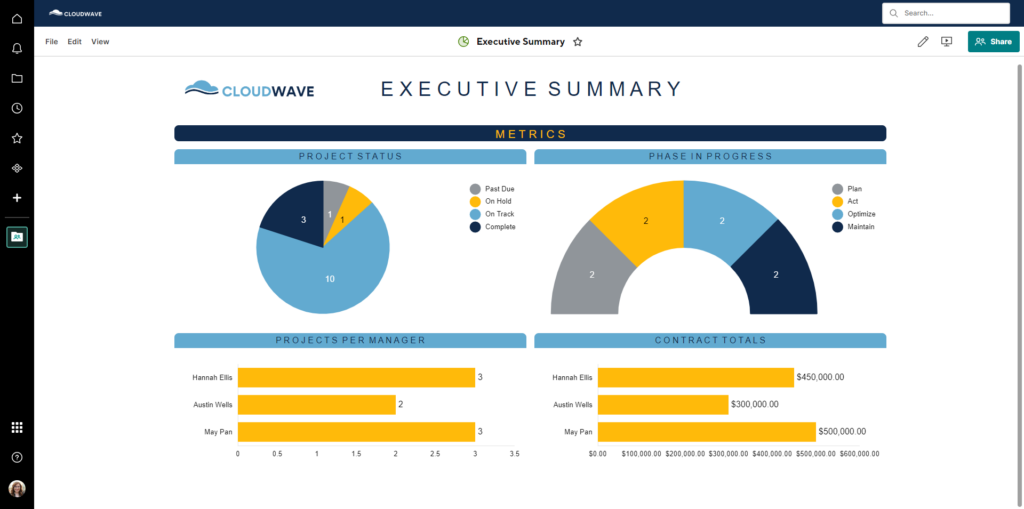
The CloudWave team designed a future state architecture diagram to be agreed upon by the customer that would leverage Smartsheet’s premium Control Center application for automation with 2 Blueprints and multi-tier functionality. Automation here includes the following:

  • When triggered, a new division would be created by Smartsheet. This division toolkit is a separate set of reports and dashboards that look at ALL the projects in the workspace and populate.
  • When triggered, a new project would be created by Smartsheet. This means that all of the sheets, reports, and dashboards would be created for the users and eliminate manual setup and copy/pasting.
  • Smartsheet then adds the project to the appropriate Division workspace. This means the project-level information would already be shared to those that need access to it, based on who can see the Division, upon creation.
  • The project is also rolled up to the executive level where dashboards, reporting, etc. are updated by this process. This means any needed project-level information is isolated and pushed to a top-most level, or executive level, for easy review and sharing.

Our CloudWave team problem solved for these goals by configuring multiple different Smartsheet apps.

The forms, validation, automations, and premium apps allow for simpler project submission and streamlined processes. This solution allows the team to capture detailed project information then create a set of sheets and reports, also known as a toolkit, to manage the job through its lifecycle, automatically populating the toolkit with appropriate project information like number, name, team and more.

Best practices and future-proofing were considered. The team, through Control Center, now leverages the Resource Management (RM) integration to connect their project plan to RM as a project. The client’s intake sheet is also capable of integrating via Smartsheet Connector to platforms like Salesforce in a future state of the solution if desired. The final solution ensures that the projects are efficiently managed across their lifespan at the project level as well as the Division and Executive levels the projects automatically roll up to.

Results

  • A form that allows anyone in the organization’s Smartsheet account with the link to submit a new job.
  • DataMesh configurations for bringing in corresponding leadership (Managers, Division Heads) when staff is assigned to the project (e.g. Project Manager).
  • A streamlined process for the core team to review, update, and approve projects
  • Automated toolkits for each new division and project via Smartsheet Control Center blueprints and multi-tier functionality.
  • Automated Resource Management projects via the Resource Management Integration.
  • Various dashboards, some leveraging current user functionality, providing increased visibility based on the needs of different audiences – divisions, managers, leadership.

About CloudWave

CloudWave Inc. is an information technology consulting firm based in Virginia that provides end to end services from architecture to development in niche cutting-edge cloud technologies. CloudWave specializes in application development, integration, and cloud offerings – SaaS, PaaS, IaS, machine learning/artificial intelligence, analytics/business intelligence, microservices, and enterprise document management. Since 2012, the company has developed classified/unclassified, innovative, cost-saving, low-risk solutions to federal and commercial customers both within the United States and globally. The team has more than 30 years of exceptional systems and architectures experience managing complex and compliant projects.

CloudWave has successfully integrated Smartsheet with Salesforce, MuleSoft, Google Cloud, Azure, Jira, Hubspot, and more so that our clients can have real-time access to all relevant information across multiple systems.

With CloudWave on your side, you can feel peace of mind knowing that you are working with an official Smartsheet platinum Partner. Our team has the expertise and experience to determine your organization’s vision, and then design a powerful solution to meet those needs.

For more information, get in touch with us here.

Space Booking: Building a Workspace Reservation System in Google AppSheet

Space Booking: Building a Workspace Reservation System in Google AppSheet

Overview

With the rising costs of corporate real estate, many companies are opting for flexible, hybrid work spaces in favor of dedicated desks. As work culture shifts from cubicles to conference rooms and cafes, the way we plan out our work days is evolving too.

To help address the need for a more modern office environment, CloudWave used Google AppSheet to develop a workspace reservation system called Space Booking. Within Space Booking, employees can reserve conference rooms for collaboration and private workspaces for focus using innovative features like floor plan maps, filters for specific supplies, an employee locator search, and reporting dashboards for admins. The app integrates with any email or calendar system so that employees can schedule time slots and receive notifications seamlessly.

Project

Our team at CloudWave is always eager to innovate using emerging technology platforms. We chose the low code platform Google Appsheet to build this new application because it has numerous benefits for users: flexibility, affordability, and mobile accessibility.

When designing this app, our team kept the end users in mind throughout the entire process. They researched the most user-friendly system for scheduling reservations and included options for requesting supplies from office managers, receiving text message or email reminders, and even highlighting favorite work spaces to make it easy to find them and book them again. The most important feature we included was the option for businesses to upload a floor plan blueprint so that users can interact with a map displaying workspace locations within the facility.

We also designed Space Booking with versatility in mind. It can work for a wide range of different business uses ranging from large corporations with multiple office buildings, to manufacturing facilities with discussion spaces, to school campuses and education resource centers where faculty meet.

To ensure Space Booking would flow seamlessly into existing platforms and tools users interact with on a daily basis, our developers integrated it with Gmail and Google Calendar so that reservation dates and reminders are always handy. For businesses who rely on Microsoft Outlook or any other major email platform, Space Booking can be customized to integrate with that system instead.

Space Booking can be used on both desktop and mobile, and the team added some innovative features that can make the work day easier with just the tap of a button. An employee locator tool can help you find colleagues within the office based on their workspace reservations. A QR code scanner allows you to make reservations for a particular room or desk instantly rather than scrolling through the options in the app.

Our team understood that admins might need some additional controls in order for the application to be utilized as effectively as possible. We added customization options for specific rooms or wings of each floor plan so that admins can restrict access to include only leadership personnel as needed. We also created a dashboard with a variety of reports on how work spaces and supplies are utilized. Visibility into this info helps admins to ensure employees are both efficient and respectful when making their reservations.

Results

  • The Space Booking app allows users to upload custom floor plan maps and reserve work spaces either within the app or in-person by scanning a QR code.
  • Users can request supplies needed for their meetings or projects when reserving rooms, locate their colleagues based on reservations, save favorite work spaces, and more.
  • Admins can restrict access of certain areas to specific leadership groups, and review reporting dashboards with details on how spaces and supplies are being utilized.
  • The Space Booking app can integrate with any email or calendar system so that users can schedule their meeting or private work spaces ahead of time and receive both email and text message reminders about their reservations.

About CloudWave

CloudWave Inc. is an information technology consulting firm based in Virginia that provides end to end services from architecture to development in niche cutting-edge cloud technologies. CloudWave specializes in application development, integration, and cloud offerings – SaaS, PaaS, IaS, machine learning/artificial intelligence, analytics/business intelligence, microservices, and enterprise document management. Since 2012, the company has developed classified/unclassified, innovative, cost-saving, low-risk solutions to federal and commercial customers both within the United States and globally. The team has more than 30 years of exceptional systems and architectures experience managing complex and compliant projects.

CloudWave has successfully integrated Smartsheet with Salesforce, MuleSoft, Google Cloud, Azure, Jira, Hubspot, and more so that our clients can have real-time access to all relevant information across multiple systems.

With CloudWave on your side, you can feel peace of mind knowing that you are working with an official Smartsheet platinum Partner. Our team has the expertise and experience to determine your organization’s vision, and then design a powerful solution to meet those needs.

For more information, get in touch with us here.

Youth Care: Building a Childcare Management System in Google AppSheet

Youth Care: Building a Childcare Management System in Google AppSheet

Overview

CloudWave developed an application that helps caretakers access critical information about children and streamline the processes to provide them with healthcare, legal representation, and basic needs.

Admins needed a way to quickly onboard and manage sensitive information for children in a secure platform. Within the app, caretakers can find contact information for families, organize and access legal documentation, transfer children’s records to different facilities, assign children to specific rooms within facilities, request specific items children need, request an appointment with onsite and offsite healthcare providers for children, and more.

Project

An organization that provides housing for children until they can be reunited with their families was seeking a data solution that would make their records easily accessible to caretakers, but also extremely secure due to the sensitive nature of the data. Caretakers needed a way to manage files like medical records, legal documents, and family contact info without any concerns about data security.

Our team at CloudWave is always eager to innovate using emerging technology platforms. We chose the low code platform Google Appsheet to build this new application because it has numerous benefits for users: flexibility, affordability, and mobile accessibility.

Our client is a large organization with multiple different on-site facilities providing basic necessities like food and shelter as well as entertainment and emotional support for the children. Since there were so many different types of data that needed to be accessible within the app, we broke everything down into categories. These include: Calendar Events, Cafeteria, Entertainment, Library, Phone Book, Legal Documentation, Medical Documentation, Order Supplies, Children, and Youth Care Workers.

Caregivers can use these different tools within the same app for everything from ordering specific clothing items for a child to updating their medical history to providing them with books and movies for daily entertainment. Caregivers can also schedule offsite appointments with doctors or attorneys for specific children and onboard/offboard them as needed.

The app also features an innovative GPS tracking feature that helps employees quickly locate each other across such massive facilities. For example, if a caregiver needs to locate a particular onsite medical professional or mental health counselor, they can look up that person by name and find them on the facility map.

There are additional admin features like dashboards that quickly display lists of caregivers and the corresponding lists of children they oversee. While this information may change several times throughout the month, the app is connected to Google Cloud Platform where all of the historical data about each caregiver and their groups of children is stored safely and accessibly.

Results

  • The Youth Care App allows caregivers to organize critical documents and provide them with necessary care until they can be reunited with their families.
  • The app can be used for scheduling appointments with healthcare providers or attorneys, ordering supplies, or even providing the children with entertainment.
  • Employees can locate each other across the facilities using the GPS log.
  • Admins have advanced features and dashboards with a quick overview of the most critical information.
  • All data is safely stored in the Google Cloud Platform.

About CloudWave

CloudWave Inc. is an information technology consulting firm based in Virginia that provides end to end services from architecture to development in niche cutting-edge cloud technologies. CloudWave specializes in application development, integration, and cloud offerings – SaaS, PaaS, IaS, machine learning/artificial intelligence, analytics/business intelligence, microservices, and enterprise document management. Since 2012, the company has developed classified/unclassified, innovative, cost-saving, low-risk solutions to federal and commercial customers both within the United States and globally. The team has more than 30 years of exceptional systems and architectures experience managing complex and compliant projects.

CloudWave has successfully integrated Smartsheet with Salesforce, MuleSoft, Google Cloud, Azure, Jira, Hubspot, and more so that our clients can have real-time access to all relevant information across multiple systems.

With CloudWave on your side, you can feel peace of mind knowing that you are working with an official Smartsheet platinum Partner. Our team has the expertise and experience to determine your organization’s vision, and then design a powerful solution to meet those needs.

For more information, get in touch with us here.

Event Tracker: Building an Event Planning System in Google AppSheet

Event Tracker: Building an Event Planning System in Google AppSheet

Overview

CloudWave developed an Event Tracker application in Google AppSheet to help organizations create and track internal events throughout their lifecycle. Event Tracker allows users to create events with details about their date, location, and expenses, and then these events flow through admin approvals at each level of the organization. Once an event is fully approved, employees throughout the organization can register. This system helps businesses maintain event approval functionality and save money on the cost of software.

Project

One of our clients was looking for an opportunity to cut down on costs and still maintain existing functionality for scheduling and tracking upcoming events.

Our team at CloudWave is always eager to innovate using emerging technology platforms. We chose the low code platform Google Appsheet to build this new application because it has numerous benefits for users: flexibility, affordability, and mobile accessibility.

The app is designed so that system admins can create an event, and then it can move through a full lifecycle approval process. Criteria within the cycle determines what level of increasing approval is needed from key stakeholders.

Each event starts out as a draft with a minimum of three to five levels of approvalI. Admins can specify the details about the event, the number of attendees, expenses associated with the event, and the supervisor who needs to approve it at the next level. Supervisors will be pinged automatically with an email so that they can review the event details and approve or reject them.

If it is rejected for any reason, it will not be able to move forward to the next phase of the life cycle. Once an event has passed through the entire approval process, users can register to attend the event. Those who are registering will be prompted to fill out follow-up forms on their travel needs for attendance.

Within the application, users can view all of their upcoming registered events and submit expenses connected to them as necessary.

Results

  • The Event Tracker App allows users to easily organize info about upcoming events, including dates and times, budget, number of attendees, and more.
  • Events move through an approval process with notifications for the admins at each level of the life cycle.
  • This application built in Google App Sheet is a cost effective alternative that still allows for robust event tracking functionality.

About CloudWave

CloudWave Inc. is an information technology consulting firm based in Virginia that provides end to end services from architecture to development in niche cutting-edge cloud technologies. CloudWave specializes in application development, integration, and cloud offerings – SaaS, PaaS, IaS, machine learning/artificial intelligence, analytics/business intelligence, microservices, and enterprise document management. Since 2012, the company has developed classified/unclassified, innovative, cost-saving, low-risk solutions to federal and commercial customers both within the United States and globally. The team has more than 30 years of exceptional systems and architectures experience managing complex and compliant projects.

CloudWave has successfully integrated Smartsheet with Salesforce, MuleSoft, Google Cloud, Azure, Jira, Hubspot, and more so that our clients can have real-time access to all relevant information across multiple systems.

With CloudWave on your side, you can feel peace of mind knowing that you are working with an official Smartsheet platinum Partner. Our team has the expertise and experience to determine your organization’s vision, and then design a powerful solution to meet those needs.

For more information, get in touch with us here.