
Using MuleSoft API to Provision Salesforce Users from LDAP Directory Services

Using MuleSoft API to Provision Salesforce Users from LDAP Directory Services
A large government client wanted to automate synchronization of its users from Enterprise Active Directory to multiple Salesforce instances.

The Enterprise Active Directory (EAD) is a shared employee directory for government employees. It enforces security policies and assists with identity management. Our CloudWave team utilized MuleSoft to integrate the EAD with Salesforce and ensure that the data was secure end-to-end.

Cutting Costs with MuleSoft

CloudWave initially developed a proof of concept to demonstrate to IT that MuleSoft can perform user synchronization and also unlock the Active Directory data via API.MuleSoft simplified the architecture by replacing a more complex architecture using Salesforce Identity Connect and IBM CastIron, saving tens of thousands of dollars in the process. While designing this project, CloudWave followed an API First approach to make sure that data gets unlocked and will be easier for consumption by other applications using API to avoid redundant point to point integration.

MuleSoft for Salesforce User Provisioning

CloudWave implemented the project from installation to go-live in 8 weeks. The total scope included installation of MuleSoft at the Company’s data centers, architecture, design, development, testing, and deployment. We also worked closely with MuleSoft architects during the course of the project to make sure we followed best practices of design and implementation. We were able to use MuleSoft connectors such as LDAP Connector, Salesforce Connector, and Message Transformers and quickly build our solution in weeks time.

The new Salesforce User Provisioning module on MuleSoft Runtime gets the user data every 6 hours via API and subsequently adds, removes, or updates the users in multiple Salesforce ORGs. The platform has the ability to provide metrics on API usage, control incoming traffic, throttling, and the ability to look at the application logs through the online console making troubleshooting issues easier. The user data is not only available for this synchronization, but it is consumable by other systems in the company via the API.

CloudWave, a certified MuleSoft partner, helps businesses to get the most out of the MuleSoft platform by delivering industry-wide integration best practices that drive digital transformation and build a better-connected business.

For more information, get in touch with us here.

About CloudWave

CloudWave Inc. is an information technology consulting firm based in Virginia that provides end to end services from architecture to development in niche cutting-edge cloud technologies. CloudWave specializes in application development, integration, and cloud offerings – SaaS, PaaS, IaS, machine learning/artificial intelligence, analytics/business intelligence, microservices, and enterprise document management. Since 2012, the company has developed classified/unclassified, innovative, cost-saving, low-risk solutions to federal and commercial customers both within the United States and globally. The team has more than 30 years of exceptional systems and architectures experience managing complex and compliant projects.
Real-Time Survey Response Synchronization to Salesforce with MuleSoft for Qualtrics

Real-Time Survey Response Synchronization to Salesforce with MuleSoft for Qualtrics

Qualtrics is an experience management company that offers a subscription software platform “that the world’s most iconic companies use to close experience gaps and deliver breakthrough results.” The XM Platform makes it simple for any organization to collect, understand, and take action on experience data (X-data) – the beliefs, emotions, and sentiments of customers and employees.

Qualtrics wanted user surveys to immediately synchronize with current Salesforce data so that their clients could access the most up-to-date information about X-data from customers.

Client Needs

Qualtrics needed to be able to push an unlimited number of survey responses to Salesforce. Then, they needed near real-time survey response synchronization to Salesforce objects with the ability to map survey responses to standard or custom objects. Finally, they needed the ability to custom schedule the synchronization between the surveys and salesforce.

CloudWave Solutions

CloudWave has many years of experience utilizing MuleSoft to integrate other platforms with Salesforce. To address the needs at Qualtrics, the CloudWave team built the following solutions:

  • Survey Responses to Salesforce Org Integration – Integrated the Qualtrics survey response platform with Salesforce so that survey responses from a Qualtrics account can be associated with one or many Salesforce Orgs.
  • Synchronization Schedule – Set up a custom schedule to send survey responses from Qualtrics to Salesforce.
  • Survey Response Mapping – Set up survey response mapping that connects Qualtrics survey responses into Salesforce standard or custom objects.
  • Synchronization Status – Now responses are collected after updating Salesforce objects, and their status is updated via email and stored in a file for future reference.

Why MuleSoft for Salesforce Integration

MuleSoft helps to connect people, processes, and data seamlessly. Using MuleSoft enterprises can:

  • Integrate Apps and Systems Quickly
  • Manage the Full API Life Cycle
  • Automate End to End Business Practices
  • Connect and Sync Data Sources
  • Exchange Data Seamlessly with the Partner Ecosystem

MuleSoft’s easy-to-use development environment can increase productivity and lower development cost. It is the best available open-source integration development tool on the market.

CloudWave, a certified MuleSoft partner, helps businesses to get the most out of the MuleSoft iPaaS platform by delivering industry-wide integration best practices that drive digital transformation and build a better-connected business.

CloudWave Salesforce Solutions

Over the years, CloudWave has perfected the skill of developing and delivering end-to-end Salesforce solutions to customers across the globe. With CloudWave on your side, you receive the assurance of working with a Salesforce Consulting Partner who has the expertise and experience to determine your company’s vision, and then design a powerful solution to meet those needs.

For more information, get in touch with us here.

Deploying Custom Integration in Smartsheet Bridge

Deploying Custom Integration in Smartsheet Bridge

Overview

The client, a major national fashion design brand and retailer, needed a solution that allowed them to leverage Smartsheet as a core part of their project management process while maintaining the ability to instantaneously sync with their ServiceNow account as well as push tickets to Smartsheet’s Resource Management for time tracking.

Project

Our CloudWave Smartsheet consultants started by identifying key business needs for the client and agreeing upon a project timeline that would allow their team to maximize the new Smartsheet environment as soon as possible. Then we began building the solution.

First, we designed the technical components based on the needs uncovered in the discovery phase. Since ServiceNow wasn’t a typical out-of-box integration at the time, the integration process required some extra customization.

Ultimately our team created a custom API solution via Smartsheet’s Bridge application to connect the client’s ServiceNow instance with their Smartsheet account, providing bi-directional support. Using Bridge, custom modules are designed to handle specific HTTP calls based on the APIs for the respective platforms that need to communicate. That data is then passed back to Smartsheet where it can be leveraged for decision making, communication, and more.

Then the team created sheets, reports, and dashboards necessary for the overall system. These components allow the customer to leverage their data from multiple sources in one platform, make decisions, communicate efficiently, and take action as needed.

Once the integration was complete, we walked the client through user acceptance testing to eliminate any potential issues. We then provided a knowledge transfer and technical documentation to the client’s admin users and continued to support them in the go-live stage.

Results

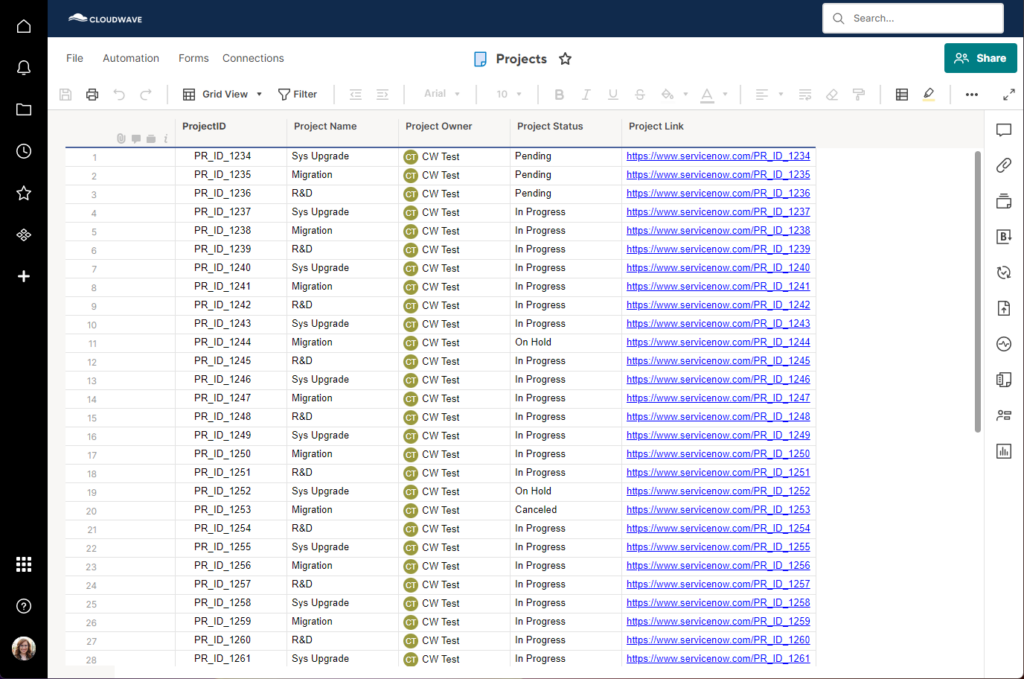
  • A successful bi-directional integration of Smartsheet and ServiceNow.
  • Smartsheet Projects are now populating to the customer’s ServiceNow automatically, including fields for ProjectID, Project Name, Project Owner, Project Status, and the Project Link.
  • Smartsheet Projects are now receiving Incident data from the corresponding ServiceNow project automatically, either by updating an existing project row or adding a new row when appropriate.
  • Incident tickets within projects are able to surface in Resource Management via Smartsheet’s panel integration.

About CloudWave

CloudWave Inc. is an information technology consulting firm based in Virginia that provides end to end services from architecture to development in niche cutting-edge cloud technologies. CloudWave specializes in application development, integration, and cloud offerings – SaaS, PaaS, IaS, machine learning/artificial intelligence, analytics/business intelligence, microservices, and enterprise document management. Since 2012, the company has developed classified/unclassified, innovative, cost-saving, low-risk solutions to federal and commercial customers both within the United States and globally. The team has more than 30 years of exceptional systems and architectures experience managing complex and compliant projects.
CloudWave has successfully integrated Smartsheet with Salesforce, MuleSoft, Google Cloud, Azure, Jira, Hubspot, and more so that our clients can have real-time access to all relevant information across multiple systems.

With CloudWave on your side, you can feel peace of mind knowing that you are working with an official Smartsheet platinum Partner. Our team has the expertise and experience to determine your organization’s vision, and then design a powerful solution to meet those needs.

For more information, get in touch with us here.

Building an Education Control Center Solution in Smartsheet

Building an Education Control Center Solution in Smartsheet

Overview

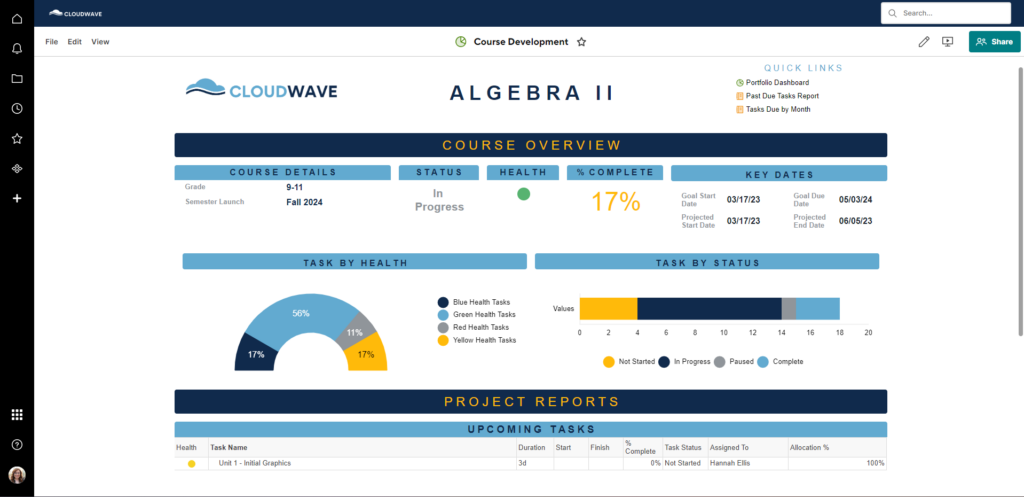
The client, a non-profit in the education sector, needed a Control Center-based solution that would allow them to leverage Smartsheet to update and develop curriculum for both virtual and in-person classes across all subjects, elementary through high school.

Project

To kick off the project, our CloudWave Smartsheet consultants worked closely with the client to understand the current state of their curriculum development system and what they ultimately wanted it to look like for the future.

The curriculum team was seeking a solution to manage the lifecycle of new curriculum development as well as tracking updates and corrections to existing courses. In addition to course development, they also needed the solution to track cost by comparing a person’s hours for their assigned tasks to their bill rate and calculating appropriately.

Based on this feedback, the CloudWave team designed a future state architecture diagram for the client’s approval. The plan was to leverage Smartsheet’s premium Control Center application with automation that would save time for all of the teams involved in the curriculum development process – SMEs, copy editors, graphic designers, and beyond.

When triggered, a new project would be created by Smartsheet. This means that all of the sheets, reports, and dashboards would be created for the users and eliminate manual setup and copy/pasting. Smartsheet then would then add the project to the appropriate workspace and share it to the appropriate people. Project level information would already be shared to those who need access to it upon creation.

The project would also roll up to the portfolio level – dashboards, reporting, etc. are updated by this process. Any needed project-level information would be isolated and pushed to a higher level for easy review and sharing.

As our team continued working on the Control Center solution, they provided routine demos to the client and continued to collect feedback. They also created all necessary sheets, reports, dashboards, and processes, considering both the requirements as well as Smartsheet best practices.

When the solution was finished, we walked the client through user acceptance testing to eliminate any potential issues.

Before handing off the completed project, the CloudWave team also created detailed documentation custom to the solution and provided various levels of training to the appropriate groups – end users, project managers, and admins.

Results

  • An automated solution that can create new projects with all the sheets and reports needed to develop any curriculum type and roll them up to the organizational level.
  • User-level reports that pull an individual user’s task list based on their login.
  • Organization-level reports that look at outstanding tasks across all courses in progress.
  • Course-specific dashboards and an organizational view for enhanced visibility and collaboration.

About CloudWave

CloudWave Inc. is an information technology consulting firm based in Virginia that provides end to end services from architecture to development in niche cutting-edge cloud technologies. CloudWave specializes in application development, integration, and cloud offerings – SaaS, PaaS, IaS, machine learning/artificial intelligence, analytics/business intelligence, microservices, and enterprise document management. Since 2012, the company has developed classified/unclassified, innovative, cost-saving, low-risk solutions to federal and commercial customers both within the United States and globally. The team has more than 30 years of exceptional systems and architectures experience managing complex and compliant projects.
CloudWave has successfully integrated Smartsheet with Salesforce, MuleSoft, Google Cloud, Azure, Jira, Hubspot, and more so that our clients can have real-time access to all relevant information across multiple systems.

With CloudWave on your side, you can feel peace of mind knowing that you are working with an official Smartsheet platinum Partner. Our team has the expertise and experience to determine your organization’s vision, and then design a powerful solution to meet those needs.

For more information, get in touch with us here.

Project Management with Smartsheet Control Center

Project Management with Smartsheet Control Center

Overview

The client, a leading financial institution, needed a Control Center-driven project management solution that allowed them to leverage Smartsheet to review, approve or reject, and manage organizational and departmental projects. As needed, the project plans would then integrate with Jira bi-directionally via the Smartsheet connector to manage those tasks in both systems without duplicating work.

Project

To kick off the project, our CloudWave Smartsheet consultants worked closely with the client to understand how project management was functioning within the organization at the time and what they envisioned for the future.

Our team determined that there were no processes in Smartsheet yet. Instead, proposals for departmental and organizational projects in need of approval were sent to the committee chair via email. These emails had to be manually managed and organized on an ongoing basis and presented to the committee members.

In addition to the email process, the client was using a combination of PDFs and excel files to manage projects. This led to poor visibility with no metrics or dashboards to track crucial financial data.

Using the info from this discovery phase, our team designed a future state architecture diagram for the client that would leverage Smartsheet’s premium Control Center application for automation and add the Jira connector in phase two, upon completion of the Control Center build.

The new system would include automation to streamline internal processes. For starters, new projects would be created automatically by Smartsheet when triggered. All of the necessary sheets, reports, and dashboards would be created for the users and eliminate manual setup and copy/pasting.

Smartsheet would then add the project to the appropriate workspace and share it to the appropriate people. Everyone who needed project-level information would receive it instantly upon creation.

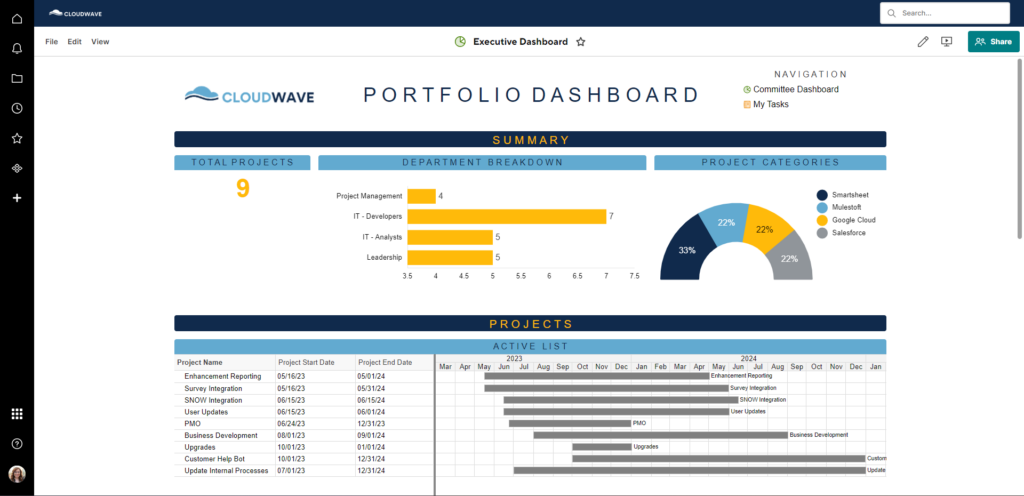
The project would also roll up to the portfolio level: dashboards, reporting, etc. could be updated automatically by this process. Project-level information would be isolated and pushed to a higher level for easy review and sharing.

Once the client approved this proposed system, the CloudWave team began building the solution, creating the sheets, reports, dashboards, and processes, and considering both the requirements as well as Smartsheet best practices.

When the project management system was complete, CloudWave led the client in User Acceptance Testing (UAT) and created detailed documentation custom to the solution. We also provided various levels of training to the appropriate groups: end users, project managers, and admins.

Results

  • A form that allows anyone in the organization to submit a new project proposal for review, reducing the time the committee chair spends aggregating emails for review.
  • A streamlined process for the committee to review proposals, request additional information from the submitter, approve the proposal, or reject the proposal.
  • Automated project plans, scoping templates, and other project sheets for each new project approved.
  • Various dashboards providing increased visibility based on the needs of different audiences: departments involved in a project, review committee, administration, etc.
  • Bi-directional sync between Jira projects and Smartsheet projects via the Smartsheet Jira connector to prevent duplication of work.

About CloudWave

CloudWave Inc. is an information technology consulting firm based in Virginia that provides end to end services from architecture to development in niche cutting-edge cloud technologies. CloudWave specializes in application development, integration, and cloud offerings – SaaS, PaaS, IaS, machine learning/artificial intelligence, analytics/business intelligence, microservices, and enterprise document management. Since 2012, the company has developed classified/unclassified, innovative, cost-saving, low-risk solutions to federal and commercial customers both within the United States and globally. The team has more than 30 years of exceptional systems and architectures experience managing complex and compliant projects.
CloudWave has successfully integrated Smartsheet with Salesforce, MuleSoft, Google Cloud, Azure, Jira, Hubspot, and more so that our clients can have real-time access to all relevant information across multiple systems.

With CloudWave on your side, you can feel peace of mind knowing that you are working with an official Smartsheet platinum Partner. Our team has the expertise and experience to determine your organization’s vision, and then design a powerful solution to meet those needs.

For more information, get in touch with us here.

Improving Smartsheet Workflows with Data Shuttle and DataMesh

Improving Smartsheet Workflows with Data Shuttle and DataMesh

Overview

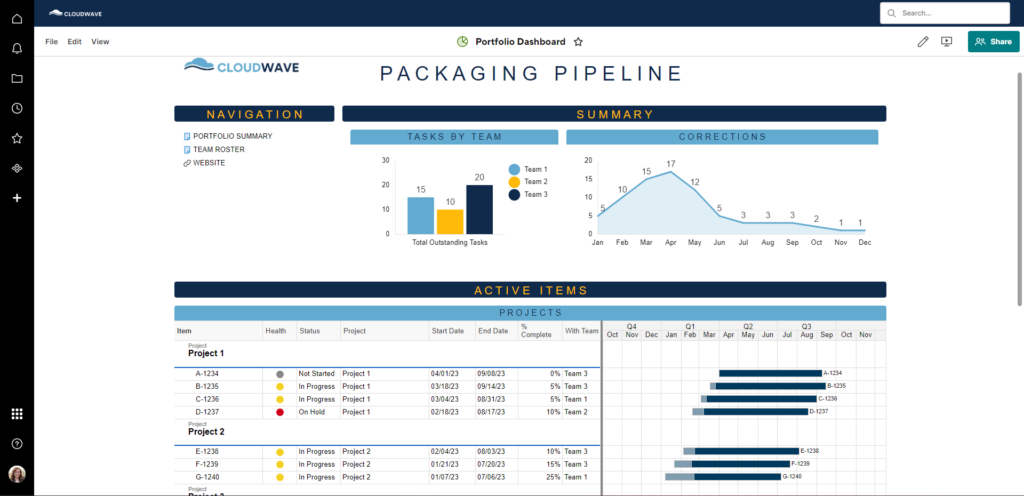
The client, the Packaging team for a global manufacturer, was seeking a solution to improve upon their existing Smartsheet process and enable the team to save time, have greater collaboration and visibility within the department, and to more easily juggle their high volume of tasks. Our solution heavily utilized premium apps such as Control Center, Data Shuttle, and DataMesh to provide a thorough tool that will serve the team far into the future. This solution allowed them to leverage Smartsheet to load items from SAP in their Smartsheet system and more easily manage the packaging lifecycle for each of those items prior to the date the warehouse would need them for distribution.

Project

To kick off the project, our CloudWave Smartsheet consultants worked closely with the client to understand the existing Smartsheet environment and used exercises like process mapping to determine the ideal future state for workflows.

We discovered that this team was already using Smartsheet, but not to its full potential or with best practices in mind. For example, the client was:

  • trying to maintain too much data in just one sheet
  • using too many formulas and cross sheet references
  • not able to easily move images around the old solution
  • not specifying levels of organization: Project and Portfolio
  • not utilizing dashboards

Our team designed the scope of the ideal future state in detail, noting improvements needed for existing sheets, listing new sheets we would need to create, and documenting overall processes we would facilitate to improve internal communication.

We helped the client leverage Smartsheet’s premium Control Center application for automation and add the Jira connector in phase two, upon completion of the Control Center build. New projects would be created automatically by Smartsheet when triggered. All of the necessary sheets, reports, and dashboards would be created for the users and eliminate manual setup and copy/pasting.

Smartsheet would then add the project to the appropriate workspace and share it to the appropriate people. Everyone who needed project-level information would receive it instantly upon creation.

The project would also roll up to the portfolio level: dashboards, reporting, etc. could be updated automatically by this process. Project-level information would be isolated and pushed to a higher level for easy review and sharing.

The CloudWave team also worked with the customer to set up DataMesh configurations, which maps and updates data across sheets. This eliminates the need for cross sheet formulas while still allowing data lookups from other sheets.

And finally, we helped configure Data Shuttle workflows. These workflows mapped data from spreadsheets pulled from external systems into the appropriate sheet that can then be dispersed and utilized across the projects.

When the configurations were complete, CloudWave led the client in User Acceptance Testing (UAT) and created detailed documentation custom to the solution. We also provided various levels of training to the appropriate groups: end users, project managers, and admins.

Results

  • A Data Shuttle workflow that imports the appropriate SAP records from a .CSV file to the appropriate sheet in Smartsheet.
  • A Data Shuttle workflow that exports from Smartsheet in a format that can then be uploaded in SAP to update records as appropriate
  • Various Data Mesh configurations that replace cross sheet formulas, freeing up space within the sheets.
  • Automated tasks lists for each specific item to manage the packing lifecycle.
  • Automated dashboards that pull in all packaging information as provided by the SAP import to replace a process that currently lives in a PDF.
  • Various reports for better collaboration including documentation on how sub teams manage their tasks.
  • A high level dashboard for visibility into the status and progress of all items currently in progress.

About CloudWave

CloudWave Inc. is an information technology consulting firm based in Virginia that provides end to end services from architecture to development in niche cutting-edge cloud technologies. CloudWave specializes in application development, integration, and cloud offerings – SaaS, PaaS, IaS, machine learning/artificial intelligence, analytics/business intelligence, microservices, and enterprise document management. Since 2012, the company has developed classified/unclassified, innovative, cost-saving, low-risk solutions to federal and commercial customers both within the United States and globally. The team has more than 30 years of exceptional systems and architectures experience managing complex and compliant projects.

CloudWave has successfully integrated Smartsheet with Salesforce, MuleSoft, Google Cloud, Azure, Jira, Hubspot, and more so that our clients can have real-time access to all relevant information across multiple systems.

With CloudWave on your side, you can feel peace of mind knowing that you are working with an official Smartsheet platinum Partner. Our team has the expertise and experience to determine your organization’s vision, and then design a powerful solution to meet those needs.

For more information, get in touch with us here.

Building a Secure Diagnostic Results Portal in Smartsheet

Building a Secure Diagnostic Results Portal in Smartsheet

Overview

The client, a diagnostic laboratory, was looking for a streamlined way to electronically communicate results with their referring clinics. The labs in question were for veterinary practices. However, they still wanted to maintain strict privacy standards comparable to those required for human patients. Leveraging APIs and automation, as well as Smartsheet’s WorkApps and Document Builder, we were able to assist in providing a secure results portal for their customers.

Project

Because our client receives physical samples, analysts needed an accurate way to validate client orders against current database entries in one single program. A solution was also needed for lab technicians to enter diagnostic results and for veterinary clinics to easily access those results using a secure, user-friendly portal. While HIPAA privacy regulations don’t apply to veterinary results, our client believes in offering animal patients the same privacy standards as human patients, thereby ensuring clients only see results for their specific animal patients.

Our CloudWave Smartsheet consultants began the project by uncovering the full scope of requirements for the solution, in terms of both functionality and security. The team presented the plan and timeline to the client in a Business Requirements Document (BRD) that included crucial information helpful to the design and implementation of the solution, including process flow diagrams, field mappings, user stories, and more.

With these parameters in place, the team could begin designing the technical components of the solution based on the project requirements. These technical components are what facilitate the communication Smartsheet and the customer’s Lab Information System (LIS), via a custom application.

CloudWave developed a custom portal, linking several solutions and working closely with the client to connect seamlessly with their current database. CloudWave leveraged Smartsheet’s Document Builder and custom-designed WorkApps to create a patient portal that works unidirectionally with the client’s database.

Our Smartsheet team then created sheets, reports, and dashboards needed for the overall system. With the right automation in place, data would move from their LIS to the target Smartsheet location. Sheets would be aggregated in Reports and filtered down as needed by current user, dates, and more. Dashboards would communicate with internal customers regarding updates, tips on how to use the system, and more.

Once the build was complete, CloudWave led our client in User Acceptance Testing (UAT) and created detailed documentation custom to the solution that included recordings of live training sessions. We also supported the client all the way through the go-live stage and continue to provide knowledge transfer support as needed.

Results

  • The successful uni-directional integration of Smartsheet and LIS.
  • Diagnostic results are now populating to the customer’s live results sheet.
  • Results reports are created via Document Builder and attached to the results record.
  • Results are accessible via WorkApps, but filtered automatically down by customer, so results not relevant to the customer viewing will not be shown to ensure privacy.

About CloudWave

CloudWave Inc. is an information technology consulting firm based in Virginia that provides end to end services from architecture to development in niche cutting-edge cloud technologies. CloudWave specializes in application development, integration, and cloud offerings – SaaS, PaaS, IaS, machine learning/artificial intelligence, analytics/business intelligence, microservices, and enterprise document management. Since 2012, the company has developed classified/unclassified, innovative, cost-saving, low-risk solutions to federal and commercial customers both within the United States and globally. The team has more than 30 years of exceptional systems and architectures experience managing complex and compliant projects.

CloudWave has successfully integrated Smartsheet with Salesforce, MuleSoft, Google Cloud, Azure, Jira, Hubspot, and more so that our clients can have real-time access to all relevant information across multiple systems.

With CloudWave on your side, you can feel peace of mind knowing that you are working with an official Smartsheet platinum Partner. Our team has the expertise and experience to determine your organization’s vision, and then design a powerful solution to meet those needs.

For more information, get in touch with us here.

Understanding AI Agents

Understanding AI Agents

AI agents are making waves in the news as major tech businesses like Deloitte, Salesforce, and Microsoft are embracing these artificial “employees” within their organizations. But AI agents are more than just the latest trendy buzzword – they have the potential to reshape how we work and where we focus our efforts.

AI has rapidly evolved, and today systems are capable of automating processes, enhancing decision-making, and driving efficiency to push business growth to the next level. The best news is: delegating tedious administrative processes to AI agents allows talented human employees to spend more time on strategy and creativity.

So how will artificial intelligence fit seamlessly into your organization? Here’s our guide to understanding AI agents, their learning mechanisms, and their applications in business.

What Are AI Agents?

AI agents are autonomous software systems designed to perform tasks, make decisions, and interact with their environment intelligently and rationally. They utilize artificial intelligence to learn, adapt, and take action based on real-time feedback and changing conditions. These agents can operate independently or as part of a larger system, continuously evolving based on the data they process.

In essence, an AI agent perceives its environment through sensors (tools like software input, data sets, GPS location, temperature readings, cameras, microphones, and more), and acts upon that information according to its designed purpose. The agent’s objective is to achieve specific goals or optimize certain performance measures by interpreting inputs and making informed decisions.

How Do AI Agents Learn?

The learning process of AI agents is fundamental to their ability to perform tasks effectively. There are several machine learning techniques through which AI agents acquire knowledge:

Supervised Learning

In supervised learning, AI agents are trained on labeled datasets, meaning that each training example is paired with an output label. The agent learns to predict the output from the input data by finding patterns in the training set. This approach is commonly used in tasks like image recognition, where the agent learns to identify objects based on annotated images.

Unsupervised Learn

Unsupervised learning involves training AI agents on data without explicit labels. The agent seeks to identify inherent structures or patterns within the data. Clustering and association are typical tasks under this category. For example, an AI agent might group customers based on purchasing behavior without prior categorizations.

Reinforcement Learning

Reinforcement learning is a type of machine learning where an agent learns to make decisions by interacting with its environment and receiving feedback in the form of rewards or penalties. The agent’s goal is to develop a strategy that maximizes cumulative rewards over time. This trial-and-error approach allows the agent to discover optimal actions through experience.

In reinforcement learning, the agent, environment, actions, and rewards constitute the core components. The agent selects actions based on a policy, the environment responds to these actions, and the agent receives feedback, enabling it to update its policy accordingly.

Examples of AI Agents in Business

There are applicable use cases for AI agents across many different business domains, enhancing efficiency, customer experience, and decision-making processes. Here are some notable examples:

Customer Service Automation

Businesses employ AI agents as virtual assistants or chatbots to handle customer inquiries, provide support, and resolve issues. These agents can operate 24/7, offering immediate responses and freeing human agents to tackle more complex tasks. For instance, companies like Amazon utilize AI agents to assist with shopping, control smart home devices, and provide real-time information, thereby enhancing user engagement and satisfaction.

Sales and Marketing Enhancement

AI agents assist sales teams by autonomously answering product questions and scheduling meetings for sales representatives. In marketing, these agents generate campaign briefs, identify target audience segments, create relevant content, and build customer journeys. They continuously analyze campaign performance against key performance indicators and proactively recommend improvements.

Workflow Automation and Productivity

AI agents are instrumental in automating repetitive tasks, thereby improving workflow efficiency and productivity. They can manage complex interactions across platforms, enabling businesses to streamline operations. For example, law firms utilize AI agents to automate administrative duties, allowing legal professionals to focus on more strategic activities.

Supply Chain Optimization

In supply chain management, AI agents analyze vast amounts of data to predict demand, optimize inventory levels, and identify potential disruptions. They analyze historical and real-time data from multiple sources, including suppliers, logistics providers, and customer orders. By automating these processes, businesses can reduce costs and improve service levels.

AI agents can also facilitate route optimization, warehouse slotting, and predictive maintenance of delivery vehicles. Companies like Amazon and Walmart use AI agents to automate warehouse operations, manage fleet logistics, and improve forecasting accuracy.

IT Operations Management

AI agents monitor IT infrastructure, detect anomalies, and respond to incidents autonomously. They can correlate log data, usage metrics, and event patterns to anticipate potential issues before they become critical. This proactive approach enhances system reliability and reduces downtime.

AI Agents and The Future of Business

AI agents represent a significant advancement in artificial intelligence, offering autonomous solutions that learn, adapt, and perform tasks across various business functions. By leveraging different learning techniques, these agents can process information, make informed decisions, and execute actions that drive efficiency and innovation. As businesses continue to integrate AI agents into their operations, they unlock new opportunities for growth and competitive advantage.

CloudWave to Host AI Webinar with Google and Carahsoft

CloudWave to Host AI Webinar with Google and Carahsoft

CloudWave is teaming up with Google and Carahsoft to demonstrate how Google AI agents and tools can transform business processes, enhance efficiency, and improve access to critical information across industries.

In an upcoming webinar on Wednesday, April 16 at 2 p.m. EST, we’ll showcase AI-powered tools that streamline workflows through intelligent search, automation, and virtual assistants. Leveraging Google AI technologies, our solutions drive smarter information retrieval, advanced data extraction, and intelligent enterprise support—reducing manual effort and increasing operational transparency.

Attendees will gain insights from real-world AI implementations, including current deployments in government agencies and additional use cases which can extend across various sectors. Join us to explore how AI-driven innovations, such as interactive virtual assistants, AI-enhanced search, and automated data processing, can optimize your organization’s workflows and ensure fast, reliable access to essential resources.

Here’s a preview of the AI tools we’ll be showcasing.

Google AI-Powered Enterprise Search for Government Documentation

Navigating complex government policies and security guidelines can be time-consuming and inefficient. Our AI-powered Enterprise Search, built on Google Vertex AI Search, revolutionizes the way agencies retrieve critical information. By indexing OMB Memoranda and GSA IT Security Guidelines, enriched with metadata, our solution delivers fast, intelligent, and contextually relevant search results.

  • AI-driven search capabilities provide instant, accurate, and context-aware responses to policy-related queries.
  • Seamless enterprise integration ensures real-time content updates, metadata-based filtering, and an intuitive, customizable UI.
  • Enhanced user experience with AI-generated summaries, natural language query support, and follow-up question handling.
  • Optimized for government use cases, reducing manual effort while ensuring compliance with official documentation.

Google AI Agent: Conversational AI for Government Documentation

Government employees often struggle to find precise answers in lengthy policy documents. Our AI Agent transforms the user experience by enabling natural language conversations to quickly surface the right information. This AI-powered assistant interacts dynamically, understanding context and guiding users to relevant insights without requiring them to know exact document names or sections.

  • Conversational search capabilities allow users to ask policy-related questions in natural language, eliminating the need for keyword-based queries.
  • Context-aware intelligence connects information across multiple documents, ensuring accurate and comprehensive responses.
  • Increases efficiency by reducing time spent manually searching policies and IT security guidelines.
  • Always available—accessible 24/7, providing instant, policy-grounded responses to support government operations.

Google AI DIY RAG Search: Transparency, Customization & Control

Building on our real-world AI search implementations, we have developed a next-generation search solution that brings greater transparency, customization, and control to enterprise search. This application enhances enterprise search across IT Security and Memoranda data stores, offering users deeper insight into result ranking, metadata, and source attribution.

  • AI-generated responses with source citations ensure clarity and trust in search results.
  • Configurable search parameters allow users to fine-tune results through prompt customization, boost-and-bury ranking options, and dynamic filtering.
  • Transparency features such as metadata visibility, extractive segments with page numbers, and relevance scoring provide users with a clear view of how results are derived.
  • Built-in evaluation tools and security guardrails enhance search reliability while preventing malicious activity.

Google AI Virtual Assistant on Slack

Discover how we built an internal AI assistant using Google Vertex AI to streamline HR and IT support directly within Slack. This AI-powered assistant responds to common employee queries—such as troubleshooting IT issues, accessing HR policies, and answering benefits-related questions—reducing the need for manual intervention and improving response times.

In this session, we’ll showcase how natural language processing and AI-driven automation enhance workplace support by making information more accessible and processes more efficient. See how this solution improves internal operations and learn how AI-powered assistants can be adapted for different enterprise use cases.

Doc Digitizer AI

Our team also developed an application that can scan and instantly digitize any document, like a handwritten form, a driver’s license, or an insurance card. Doc Digitizer AI can be trained to read any type of form or document, reducing both time and errors associated with manually entering information into a database.

Looking to improve government efficient with AI?

Register and learn more.

If your team needs support automating your most monotonous and time-consuming manual tasks, AI can transform your work day without compromising quality, security, or human impact. Register for our Google AI Agents & Tools webinar to learn more.

FedRAMP 20x: Accelerating AI Adoption in Government

FedRAMP 20x: Accelerating AI Adoption in Government

This spring, the General Services Administration unveiled FedRAMP 20x, a significant update to the Federal Risk and Authorization Management Program (FedRAMP). This initiative aims to streamline the authorization process for cloud service providers, enhancing the federal government’s agility in adopting advanced technologies, including artificial intelligence.

Overview of FedRAMP 20x

FedRAMP, established in 2011, provides a standardized approach to security assessment, authorization, and continuous monitoring for cloud products and services used by federal agencies. The program ensures that CSPs meet stringent security requirements before they can offer services to the government. However, the traditional FedRAMP process has been criticized for being time-consuming and complex, often hindering rapid technological adoption.

FedRAMP 20x addresses these concerns by introducing several key enhancements:

  • Accelerated Authorization Process: The updated program reduces the time required for CSPs to achieve authorization, enabling faster deployment of cloud services.
  • Risk-Based Framework: Adopting a more flexible, risk-based approach allows for tailored security requirements based on the specific services and data involved.
  • Enhanced Collaboration Tools: New platforms and tools facilitate better communication and collaboration between CSPs and federal agencies during the authorization process.
  • Continuous Monitoring Improvements: Strengthened continuous monitoring protocols ensure ongoing compliance and security of authorized services.

FedRAMP 20x Implications for AI Adoption in Government

The modernization of FedRAMP is poised to significantly impact the federal government’s ability to integrate AI technologies. By easing the authorization process, agencies can more readily adopt innovative AI platforms to enhance operations, decision-making, and public services.

AI Platforms for Government Use

With the streamlined FedRAMP 20x, several AI platforms are now more accessible for federal agencies:

GSA’s Generative AI Tool: The GSA has introduced a generative AI tool designed to boost efficiency and help automate repetitive tasks. This platform is now available to GSA staff and aims to enhance productivity within the agency.

OpenAI’s ChatGPT Gov: OpenAI has launched ChatGPT Gov, a specialized version of its chatbot designed for U.S. government agencies. This platform allows agencies to securely utilize OpenAI’s models, including GPT-4o, within their own Microsoft Azure cloud environments, ensuring stringent security and privacy controls. Features include conversation sharing within workspaces, custom GPT creation, and an administrative console for IT management. The initiative aims to enhance the handling of sensitive data and improve public services.

Google Cloud’s AI and Security Services: Google Cloud has extended its security and AI services to U.S. government customers through FedRAMP authorization. Google Cloud AI includes Vertex AI for machine learning model development, Document AI for intelligent document processing, and Translation AI for multilingual support. Additionally, Google’s AI-driven cybersecurity tools help agencies detect and respond to threats in real time, ensuring compliance with stringent federal security requirements. These solutions allow government agencies to modernize operations while maintaining security and efficiency.

Microsoft Azure AI for Government: Microsoft Azure AI provides a suite of AI services tailored for federal agencies, including Azure Machine Learning for predictive analytics, Azure Cognitive Services for natural language processing and computer vision, and AI-driven automation for streamlining government workflows. Azure’s AI capabilities also support edge computing and AI-powered cybersecurity to enhance threat detection and mitigation. With built-in FedRAMP compliance, Microsoft Azure AI ensures that federal agencies can securely leverage AI for mission-critical applications.

CloudWave AI Solutions for Government

CloudWave has served as a consulting partner for the GSA and numerous other government agencies since 2012 – we understand the pain points that agencies face and believe in a future where automation tools can help solve those problems

CloudWave has developed AI-driven solutions tailored specifically for government agencies to enhance efficiency, automation, and decision-making. These include AI-powered virtual assistants for government workflows, intelligent document processing to streamline data management, and machine learning models for predictive analytics. With a focus on security and compliance, CloudWave’s AI offerings are designed to integrate seamlessly with existing government systems while ensuring adherence to FedRAMP standards.

The Future of FedRAMP 20x and AI Technology

The introduction of FedRAMP 20x marks a pivotal shift in the federal government’s approach to cloud service adoption, particularly concerning AI technologies. By simplifying the authorization process and embracing a risk-based framework, federal agencies are better positioned to integrate advanced AI platforms, thereby enhancing operational efficiency, decision-making, and public service delivery.